
My biggest complaint about the Nexus 7 home screen is that it doesn’t rotate into landscape mode when I turn the tablet on its side.
There are many ways to make the Nexus 7 automatically rotate to landscape mode, but my favorite involves an app that changes rotation behavior and puts controls in the notification bar.
I’m always using the tablet in landscape mode for Twitter, games and movies, and dealing with the lack of landscape mode is annoying.
Ultimate Rotation Control is a free to try android app that can force the Nexus 7 home screen to rotate to landscape using the accelerometer.
The Ultimate Rotation Control app allows users to set the rotation to auto, forced auto and locked. The app also includes per app setting sot force rotation on apps that normally stick in portrait orientation.
To use this app, Install Ultimate Rotation Control from Google Play. The app is free to try for one week, then requires a license purchased for $2.99.
After installing the app, pull down the notification drawer and tap on the middle rotate icon with an F. This will force rotation and allow the Nexus 7 to rotate to landscape on the home screen and in apps.
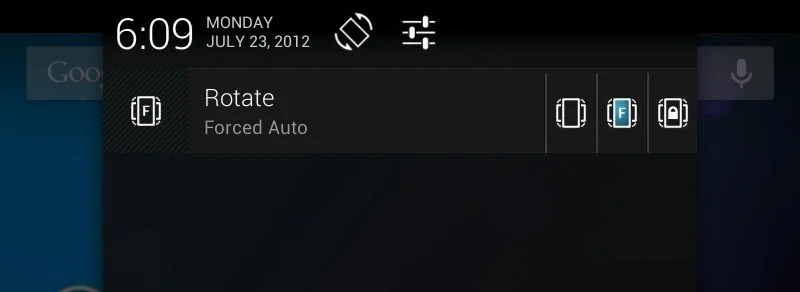
The same setting will allow the Nexus 7 to rotate to all orientations, so the Android buttons could be by the camera. With this setting the display will be oriented right-side-up no matter how the Nexus 7 is held.
There are other ways to rotate the Nexus 7 home screen to landscape, including installing new launchers like the Apex Launcher and others.



Rotate your screen for $2.99. What a joke.
On my iPad 3 I can just turn the device on its side and boom its in landscape mode, maybe you should think about that the next time you choose a tablet. iPad rules and always will do, f*** paying $2.99 for an app which only lets you go side ways haha what a joke bellend
Getting the iPad is a joke. This app is free now, so there goes your argument. The Nexus 7 is a far more powerful device than the iPad and at only half the price. Android is also a better platform than iOS, which has pretty much stayed exactly the same and barely allows you to do anything with it. And who in god’s name would buy one tablet over another simply because one has landscape mode?
Thank you. Finally Someone who sees it the same way me and my brother see it. People buy things for the stupidest reasons. Like sheep following the leader, its actually quite sad they get ripped off without knowing it.
16gb iPad = $499
Nexus 7 + Screen Rotation App = $252
Fuck paying $500 for an overpriced trendy consumer product. What a joke.
yeah cuz wed rather pay $250 more for something that charges you around every corner that google doesnt lol what a joke your serious hahahah loser
Oil considering the iPad is hundreds more in price and isn’t my thing I’ll stick to the nexus 7 which is amazing
@Ben
So you paid almost $1000 so you can turn your screen into landscape mode? The nexus 7 does everything the iPad does better and for wayyy cheaper. Typical Apple n00b sheep LOL!
I can’t wait to see what the Appletards will make up next if/when there is a Nexus 10 tablet.
I can’t believe this. I bought a tablet that won’t auto rotate, what good is my alano case I bought at portenzo now? I paid extra for their intellistant that sits in. Portrait mode. I guess this 3 bucks will work for now. People wonder why apple is the leader. By the way, shout out to Lea
Get this now-free app and you CAN auto-rotate.
Or get a custom launcher.
You know that there is a free app as well right?
Don’t forget that Nexus 7 comes with a $25 credit to Google Play store. Would anyone care to tell me what the free app is called? Ultimate Rotation still says 7 day trial and you have to buy the code after that. I think it might be worth a measly $3 out of my $25 Nexus 7 credit, but free would be even better.
If you’re rooted and have Titanium Backup, you could always buy the license outside of the app (directly go to the Play Store) do a backup, then get a refund. I kinda doubt that would be successful. If you want a true Nexus 7 rotating homescreen that doesn’t mess up other apps, I highly suggest a custom launcher like Apex, Nova, Go Ex, Holo, etc. They work flawlessly.
Settings > Accessibility > Auto-Rotate Screen
This is a setting that is built into the operating system, entirely for free. The implementation is the same as the iPad, the main screen does not rotate, though pretty much any app will rotate. I don’t know why auto-rotation is not enabled by default, but there you go. As discussed, if you want more control over home screen rotation install the discussed app or a different launcher such as GO Launcher.
As a side note, this is the beauty of the android platform. If you like the way it is designed, great; if you don’t you have almost infinite customization and changes you can make, as opposed to the iOS platform which is largely locked with a preset of preferences and layout.
The main screen on the iPad rotates. The biggest reason I need autorotate is because many apps do work great in landscape.
I agree, It should come with this turned on.
Omg thanks so much.
<3 you.
i just down loaded rotation locker by madmack and it works flawlesly on my n7
“Rotation Locker” App also do the trick, and it’s free!
Hey guys? Swipe down from the top on the home screen to show the notifications bar. There’s a rotation unlock button right there. Portrait mode is locked by default for some reason, but the mode to rotate is already there.
Well done best informed info on this site
Many thanks for spotting the unlock button for landscape mode, just did mine, much prefer using the n7 in landscape.
For anyone who has upgraded to Android 4.2, the auto-rotation lock is now accessible by swiping down on the right side of the screen. Swiping down on the middle or left brings out the notifications. The device rotates just fine in 4.2 even on the home screen.
This is the first time that I’ve added a comment so bear with me please. I have a nexus 7 and I have found that you can alter the settings so that it changes from portrait to landscape modes. On the opening screen touch the screen at the top rh corner and drag down, shows settings, names etc and also an option to unlock rotation. It works.