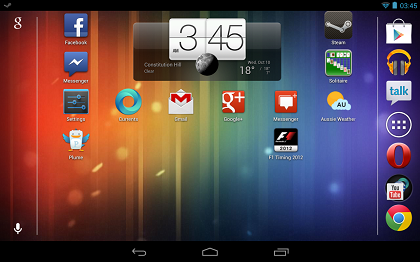
Google has begun to roll out the Nexus 7 Android 4.1.2 Jelly Bean update today though it appears that the update is rolling out slowly as many Nexus 7 users remain without the update.
The software roll out was first noticed by EE Times who reports that the update rolled out for at least one Neuxs 7 user in Australia. The update doesn’t appear to be a massive update but it apparently does bring one big change for Nexus 7 users.
The prompt for the update says that the update will improve performance and stability and fix bugs that Nexus 7 owners have been dealing with. It does not specify what those bugs are. The big change that it brings is the ability to rotate the home screen to landscape mode. Before this update, it was impossible to do that. While not a mind-blowing feature, it’s certainly nice to have.
Thus far, we have not received the update to Android 4.1.2 Jelly Bean on our Nexus 7 devices. We have tried the manual update method, but thus far, the update has not become available. Those who are looking to get the update now might have some more luck. To try and pull the update, try this method.
1. Go to Settings -> Apps -> All
2. Find Google Services Framework.
3. Tap on Force Stop.
4. Select Clear Data.
5. Head back to the Nexus 7′s Settings, go to About, and check for a System Update.
Some users use different combinations of Clear Date and Force Stop, others turn off their device then power it back on after clearing the data, but in the past the above method has worked.
For those Nexus 7 owners that are rooted and unlocked, we’re seeing that the update does not break these which means that installing it will be an extremely painless process.
The update is pretty small, a little over 30MB, so it shouldn’t take too long to download and install once it has become available.
Anyone seeing the update yet?



Don’t see the update….even with the trick. Will stay tuned. BTW; have a Nexus 7 if that matters
same here tried the trick and even tried rebooting first. No luck. Nexus 7
Didn’t work for me too
Didn’t work(Nexus 7)
Just got the update prompt a few minutes ago here in Tennessee :-)
For my Nexus 7 ^^
neither did it for me
Nothing…
Nothing either …here at Sydney, Australia
No updates yet in Denmark for my Nexus 7
Doesn’t update for me either, Here in New Zealand with a Nexus 7
Nothing here either… Nexus 7, Canada
Doesnt work at all. Malaysia.
Just got mine. Malaysia
Still nothing for me. Nexus 7
I got the update. It killed the auto-off magnetic switch in my case.
I rely on the on/off with the magnet. I mounted the tablet in my truck (added to head unit for functionality). works great tethered to Galaxy Note for Nav. The power button is behind the dash and since this morning’s update, I have had to hold a small magnet on the stereo faceplate just so it wouldn’t drain the tablet battery while in park. ANYONE HAVE A FIX FOR THIS? system and display settings amount to a hill of beans so far.
Did the reset of the Google Service, then went to update, it told me my tablet last checked for an update 12/31/1969 LOL.
For me it showed 1/1/1970 LOL xD
Nothing here in UK
I’ve got the update UK midlands
Italy, nothing here either….
Nothing in New York City
Nothing here still, 9:14 PM 10/10 United States. Nexus 7. Tried the fix above with Google Service but still didn’t work.
dont’ update in VietNam
Any one in Sydney yet???
Hey now, that’s my girl friend……
Nothing in Brisbane!
Nothing in Melbourne
unfortunately, nothing to report either – gnex + gnex 7
Nothing here yet. NEXUS 7. Sydney, Australia.
For offered the update this morning in Sydney. I chose the restart and ended in CWM recovery without a file to update. It’s not offering it now. Any ideas?
Nothing in Dublin either…
Worked for me in the uk.
Tried the suggestion above. No update yet – UK
no update yet.. Nexus 7 – California.
Worked for me. Central PA, USA.
Received and installed update in uk today
Did work in Slovakia
no update for me yet in uk, birmingham . btw your guide f*#ked my auto update for google play. not just mine by the look of it. thanks. do not click clear data click clear cache was the advice i got after contacting goolge help
I got the update just now :)
Thanks GottaBeMobile, love you guys! Your fix worked for me on October 11, 2012. I suspect Nexus 7 users just need to be patient or use a fix such as this. At first I got the weird date bug yet no biggie. I’m about to reboot and install, crossing my fingers! Okay here we go. “Optimising app 16 of 127″. Went fairly fast.
Huh I just read the previous comment which says “do not click clear data click clear cache was the advice i got after contacting goolge help”. Doh! Well I hope I’m not borked. But my apps seem to be updating so yay!
Tons of apps are updating.
So far so good! “Diz is da good medicine”, as my illiterate college buddy would say.
Additional note – Before updating, I went to a photo wallpaper rather than a live wallpaper, and I plugged in my Nexus 7 (to the WALL, not to a PC) and waited for full battery to ensure battery wouldn’t cause any delays. Numerous minutes in, and everything checks out. Good update!
I am on the Sunshine Coast QLD a Australia and I woke too the update waiting too install this morning everything is working fine :)
That did the trick here in CT, US. No problems resulting from the update whatsoever. No problems with Google Play or any of my apps.
Got it yesterday (11-10-2012) night here in India.The system update went smoothly.Really nice to have the home screen in landscape mode.Other than this what te update does to the device is not known.
Updated in Saudi Arabia!
When I just checked the update, it didn’t work.
However, when I tried again with pretty awesome trick, it totally worked.
So I’ve updated.(US / Nexus 7)
worked fine here.. updated in Canada
Oddly enough, my partner’s Nexus updated last night but I haven’t had it. UK here, both bought from the same place and we live together. My guess is the download throttle has been set low, so that the servers aren’t overloaded
just got the update in Singapore. However, it seems to have broken stickmount and supersu
Just got the update! I didn’t even know what it was for and was pleasantly surprised it came up-and-down my lock screen was in landscape! Yay! Now I’m just searching for other new things that came with this update
Still not available here. US / Nexus 7 / 16GB (pre-ordered unit, 8GB Google IO version of co-worker was updated).
The trick worked. Canada, Ontario. Nexus 7 build # JRO03S
Worked for me. But I had to restart the Nexus 7 after the forced stop and data clear. I it is updating now.
update yesterday, but only slows performance & can still not rotate home screen
waste of time
Just got it. Definitely allows auto rotate of home screen. U have to enable it in accessibility menu.
The first method worked… downloading the update as of now… thanks. this is the only site which gave a workaround to automatic updates
I tried the trick 2 times, and worked! Thanks!
Got it in Atlanta yesterday.
I got the Nexus update a few days ago and ran it. Just about everything is working great except one of my apps – Phase 10 no longer works. I sent a message to the manufacturer and hopefully they’ll get back to me soon. Other than that everything is working great. Thanks guys!
Mine won’t update either :(
it worked with the trick, THX .. Brooklyn, NY
Totally work for me!
Trick worked, downloading it now. Australia
It worked for me straight away in australia
Mine was done on day of release, my wife’s unit, bought at exactly the same time and at the same store, has still not received her update to 4.1.2….
Strange !
Received update in UK using the above method :-) on my nexus 7
I GOT THE update you can turn it side ways now!!!
I got the update either, but my situation is I got the update notification after switch the step 3 and step 4 @@
Say what?
Hi!! And when you clear all data then you must make a login with your account?
I had the update request, but as the device is rooted i did not want to update. i cleared and unchecked the google framework option
. Go to Settings -> Apps -> All
2. Find Google Services Framework. – Clear and uncheck.
I did not want to loose my stick mount feature.
How long for the download? I got message on my galaxy nexus “don’t turn off target device!! with big green android… let it sit for 30+ minutes, then realized it seemed to be pointing to the on/off button and said “START” – so I pushed on/off button, but no update. Tried it a couple of times..still nothing.
just worked for me finally on my nexus 7!
Just got it in Colorado, USA. It did NOT kill the magnetic screen on/off function.
My Stckmount won’t work properly after update. I use a USB OTG for storage and I may need to uninstall the update or re-root.
Actually got the update tonight on my samsung galaxy nexus in Savannah, GA but front screen won’t rotate. About screen says 4.1.2. Not sure what else I’d see…
Rotate menu to landscape was not ‘impossible’ before update …. just needed the Rotate app.
i am on JB 4.1.2 i9250 Baku
got the update, but for my nexus s
I have tried a couple of dozen times. It never takes … what’s up with that. Under “about” still show 4.1.1?
it worked a little but then i got a red ! mark. what does that mean?