
Gaming
How to Download the Xbox One Black Ops 3 Beta
The Xbox One Black Ops 3 beta starts on August 26th, and the odds are good that you will be able start your Xbox One Black Ops 3 beta download soon. Like last week we plan on an early arrive of the Black Ops 3 beta tokens for Xbox One and PC later today.
Here is how to download the Xbox One Black Ops 3 beta right now, with where you need to look to find your beta token and two free Xbox One Black Ops 3 beta tokens to share.
Update:Xbox One Black Ops 3 Beta Problems Frustrate Users
After wrapping up a week of the PS4 beta, the Xbox One Black Ops 3 beta starts in a few hours along with the PC version. The official word is that the Xbox One Black Ops 3 beta download codes will start rolling out at 12:01 AM Pacific or 3:01 AM Eastern on August 26th, but gamers are counting on an early arrival of codes like we saw with the PS4 beta.
[contextly_sidebar id=”DriLjijD9FPwCBmXu9NiL7MZ727BbFMS”]
Even if you get your Xbox One Black Ops 3 beta download codes this evening you should not expect to play right away. The 12-15GB download will take some time and you may need to download a patch on top of the main download. The PS4 beta download took over six hours on a fast home connection, and the Xbox One Black Ops 3 beta download may take just as long during the first hours when the server is hammered.
Although Treyarch did not yet offer an estimated time, David Vonderhaar recently stated that the team is doing system checks and is focused on the release at this moment.
Here is how to download the Xbox One Black Ops 3 beta and start playing as soon as the codes arrive.
Where to Find Your Xbox One Black Ops 3 Beta Token

Find your Xbox One Black Ops 3 beta token.
[contextly_sidebar id=”CkpxtcYsslAeXX9Z6VCsRkLG9SGQvuK3″]You need to make sure you registered for the Call of Duty: Black Ops 3 beta using the codes that the retailer you pre-order from provided. You need to enter those codes into the Call of Duty website so that you can get the Black Ops 3 beta download token for Xbox One.
The only exception is if you pre-ordered the digital copy of Call of Duty: Black Ops 3 on Xbox One from the Xbox Store. If that is the case you are already registered and just need to download the beta as soon as it is live on the store.
Update: If you did not get the Call of Duty: Black Ops 3 beta code that you need to register, and you pre-ordered from Best Buy, use this guide to contact the right person to get your Xbox One BO3 beta code that you need to register to get this download token.
If you bought the game in stores, go to the email address you used to register for your Call of Duty account. Search for an email from Call of Duty, [email protected], with the subject Your Black Ops 3 Beta Token is Inside.
As soon as your email is sent out you should find your beta tokens and two others to share with friends during the beta. As of now you need a beta download token for this, but this weekend the Xbox One Black Ops 3 beta may open up to all.
How to Download the Xbox One Black Ops 3 Beta

How to download the Xbox One Black Ops 3 beta.
This guide shows you how to download the Xbox One Black Ops 3 beta as soon as it is available using the beta token that will come to your inbox soon. You need to wait for your code and if one never arrives you will need to contact Activision support.
- Turn on the Xbox One and sign in. Go to the Store on your home screen.
- Next select games on the right side of the screen.
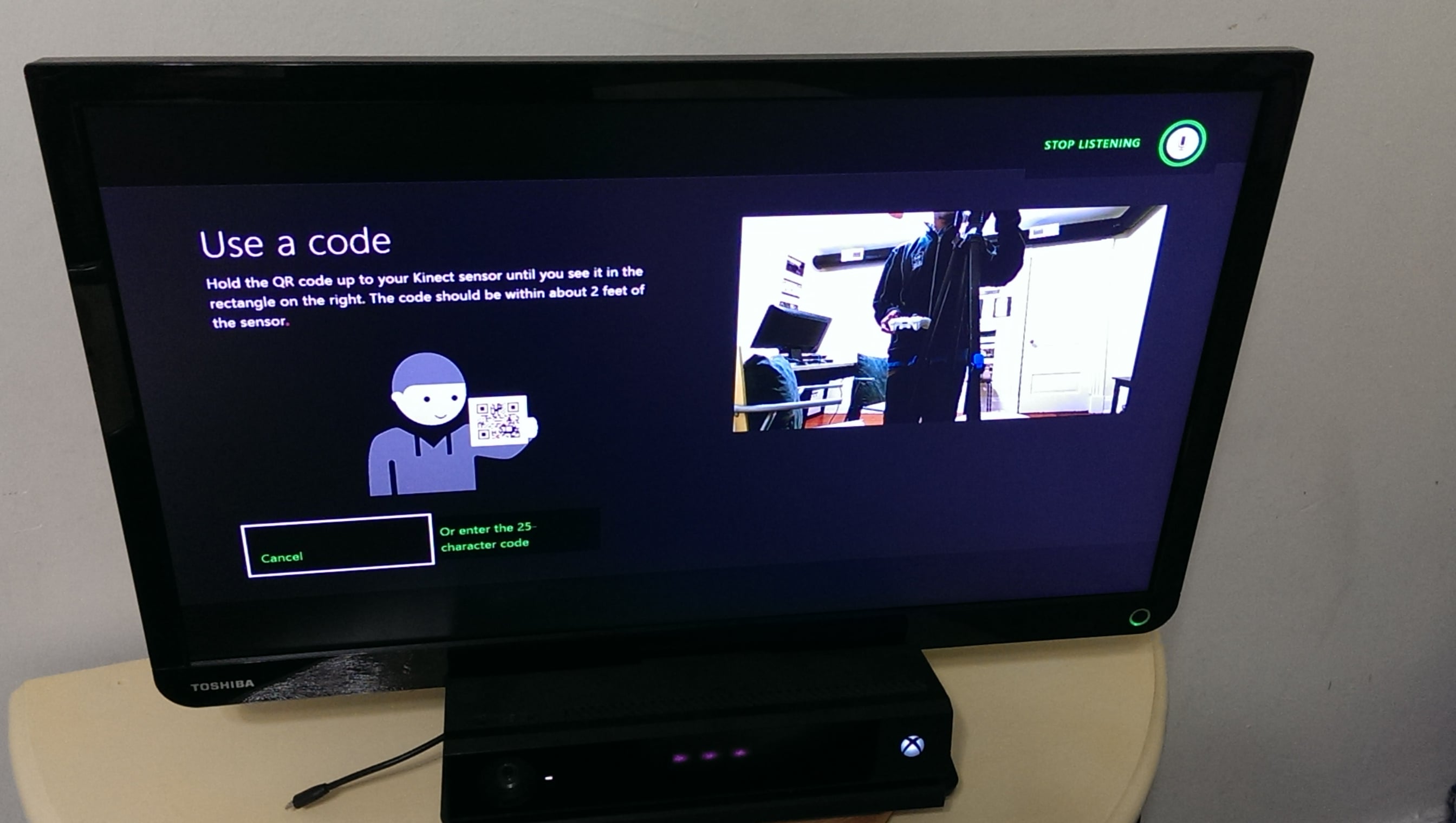
- On this next screen choose Use a code.
- Enter the 25 character code that you received in your email. Do not enter hyphens or spaces.
- If all goes as planned you will see a confirmation screen and can redeem your code.
Users report problems redeeming the Xbox One Call of Duty Black Ops 3 codes. Treyarch is working on a fix.
We’re tracking an issue regarding #BO3Beta codes. We are currently investigating and will let you know more when we can…stand by.
— Treyarch Studios (@Treyarch) August 25, 2015
This should start the Xbox One Call of Duty: Black Ops 3 beta download. It’s a good idea to make sure this is your only download or your first if you want to play it immediately as the Xbox only downloads one game at a time.
Wait for the Xbox One Black Ops 3 beta to complete and install. You will see progress on the My Games and Apps page.
When this is complete you can start playing the Call of Duty: Black Ops 3 beta on your Xbox One. If your Call of Duty: Black Ops 3 beta token doesn’t work you can contact Activision through this link to get help.
[slides postid=310330]
