
Mobile
Choose iPhone or Bluetooth When Activating Siri in iOS 6
I can’t begin to count the number of times I started to use Siri and quit because a Bluetooth headphone was connected to my iPhone and out of reach.
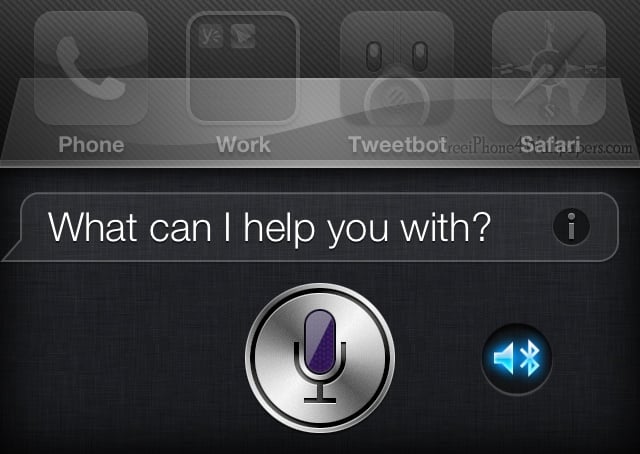
In iOS 6, Apple solves this issue with a new audio selection icon visible when activating Siri with a Bluetooth headset connected.
The new option allows users to choose between the iPhone and a Bluetooth headset, just like selecting the audio source on a phone call.
Read: 40 iOS 6 Features You’ll Actually Care About
This is an awesome addition for users who routinely have a Bluetooth headset connected, but not on their ear.

Pick the audio source for Siri in iOS 6.
As shown in the image above, the small Bluetooth icon allows a user to pick between the iPhone and a Bluetooth headset. Siri will remember the selection until it is changed.

Choosing the iPhone as Siri's audio source.
Another nice touch is that this allows the Raise to Speak feature to work with Siri while a Bluetooth device is connected. When a Bluetooth headset is connected Siri cannot normally be activated this way on iOS 5 and in iOS 6. The new feature will change the default audio source for phone calls, so switching a call to Bluetooth will switch Siri back to Bluetooth.
I hope Apple builds in the ability to Raise to Speak with Bluetooth connected, where the iPhone automatically uses the iPhone as the source for audio.
Now that I can use Siri on the iPhone even when I have a Bluetooth headset connected I’m going to be using Siri a lot more often.
Check out more of Siri’s new features in iOS 6 in the hands on video below.
https://www.gottabemobile.com/2012/06/12/hands-on-with-siri-ios-6-beta-video/
