
How to
How To Keep Your Android Screen On While Listening To Music In the Car
Android devices like the HTC Thunderbolt and Droid X2 make for great multimedia devices in the car especially with all the great music apps currently available. The biggest issue is that on most phones and in most apps the screen will go blank and the phone will lock after a short period, even while plugged in.
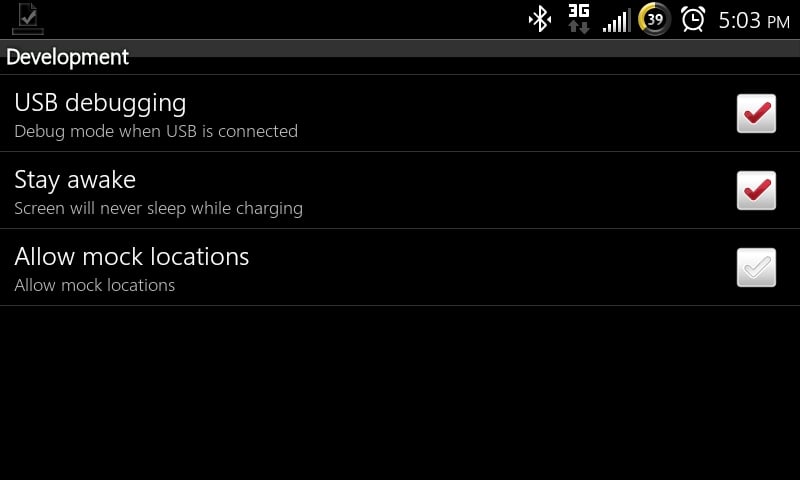
Some apps like Pandora have a setting to keep the display on, but if you want to use other apps in the car you’ll want to turn on this development setting that keeps your phone from going to sleep while you have it plugged in. You do not need to be rooted to do this.
How to keep Android Awake While Plugged In
- From Android Homescreen press Menu.
- Choose Settings.
- Open Applications.
- Tap on Development.
- Check next to Stay Awake

That’s all you need to do. We had been looking for an in-app setting to keep our ThunderBolt awake while we listened to Rhapsody and asked for this feature to be added to the app only to find out it was right in front of us the whole time thanks to the RhapsodyAndroid Twitter account.
Now that our ThunderBolt will stay awake in the Breffo SpiderPodium mount we are ready to start listening to some tunes in Rhapsody while we go cruising in the summer sun.
