
Apple
65 Exciting Things You Can Do With the Apple Watch
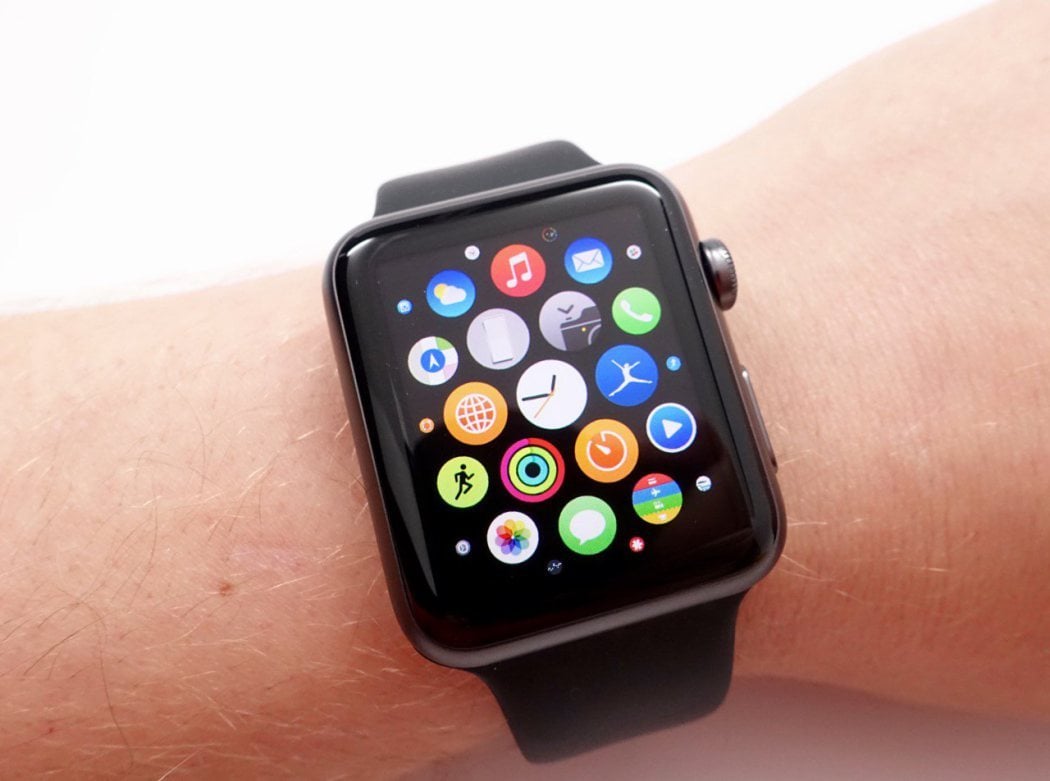
Right out of the box, an Apple Watch can help keep you healthy, deliver notifications, make calls, send texts, run simple apps, and even save your life. But the real magic happens when you install apps and personalize your Apple Watch to help you achieve exactly what you hope to do in any given day.
In this guide, we’ll show you exactly what the Apple Watch can do in a variety of settings. Some of them may sound obvious to long-time Apple Watch users, but we promise there are some cool things listed below that you’ve never tried since the Apple Watch and WatchOS are constantly evolving.
Almost all recent Apple Watch models can do everything listed below, but some of the features are exclusive to more recent Apple Watch models. If you are using an Apple Watch that’s a few years old and want to be able to do everything listed in this guide, you may need to upgrade to the newest Apple Watch SE, Apple Watch 8, or Apple Watch Ultra.
The Apple Watch is more than a miniaturized iPhone on your wrist. When you understand what you can do with the Apple Watch it becomes an amazing tool to help you get through your day, be more productive, lose weight, and even save money.
Your Apple Watch can do more than anyone likely needs. But just about everyone should get to know the basic Apple Watch features that are at its core. However, a lot of people don’t make use of the Apple Watch’s best features. This Apple Watch series aren’t the only watches that connect to the iPhone, but they are the best for most people.
What Can the Apple Watch Do with watchOS 9?
With watchOS 9, there are more workout views, a new compass layout, improved medications reminders, better sleep tracking, and more dynamic watch faces. These, combined with many other watchOS 9 features, means you can do more with your Apple Watch than ever, and rely less on your iPhone. That’s important for those that aren’t allowed to or aren’t able to pull out their iPhones whenever they choose. There are more details within each of the sections below.
Table of Contents
Communicating Quickly
1.) Answer Calls on the Apple Watch:

You can answer phone calls on your Apple Watch, using it as a small Bluetooth speakerphone. There’s no need to pull out your iPhone for shorter calls thanks to the Apple Watch’s built-in microphone and speaker. Just keep in mind that those nearby may be able to hear your caller and the speakerphone on the Apple Watch isn’t nearly as loud as the iPhone’s.
You can also use your Apple Watch to quickly let callers know that you can’t talk at the moment by tapping one of your pre-set replies, such as “Sorry, I can’t talk right now.”
2.) Place Calls from Your Apple Watch
You can place calls from your Apple Watch in a flash. All you have to do is hold the Apple Watch’s crown down to activate Siri and ask your watch to call a contact. If you are dialing a number that isn’t in your contact list, then you can also tap it into your Apple Watch using an on-screen keypad.
If you have an Apple Watch GPS + Cellular, you can make or receive calls on your Apple Watch, even when your iPhone isn’t nearby. This requires adding the watch to your plan for about $10 per month with your wireless carrier. The Apple Watch Ultra comes with the cellular feature baked in. If you want to make calls from other models, you need to plan ahead and make sure you buy a cellular model as there’s no way to upgrade down the road.
3.) Call 911 in Two Steps

In an emergency, the Apple Watch makes it fast and easy to call for help. All you need to do is hold down the side button for a few seconds until three options pop up. Sliding the SOS icon to the right will activate an emergency call. Regardless of where in the world you are, the Apple Watch will call the appropriate phone number for emergency services. While you may be used to dialing 911, the Apple Watch is smart enough to dial the proper number and even key in any confirmation number local authorities require.
4.) View and Reply to Texts and iMessages on Your Wrist

Text messages and iMessages instantly appear on your wrist so you don’t have to take your phone out of your pocket. You can also reply quickly with canned messages, emojis, Siri or by scribbling letter by letter what you want to say. The canned messages often pick up on the context of a text so that you can tap on an option that someone gives you.
You can also see recent conversations in the Messages app on the Apple Watch. This works with both iMessages and text messages.
5). Send Facebook Messages

Facebook Messenger is a popular app for staying in touch with family, friends and groups. You can receive Facebook Messages on your Apple Watch and even reply with with text, emoji, a thumbs up, your location or a custom message using the microphone to dictate. If you rely on Facebook Messages to stay in touch, this is an awesome feature. Facebook Messenger supports the scribble reply feature so you can reply even when you can’t talk.
6) Use the Apple Watch as a Translator

You can use your Apple Watch as a translator so that you can talk with people you don’t share a common language with. There is even an offline mode to use when you are traveling and don’t have a cellular connection.
iTranslate is a free app that offers in-app purchases to unlock some additional features. The app allows you to translate between more than 100 languages. The app translates quickly and allows the person you’re communicating with to read what you said in their native language. There’s also an option to have the Apple Watch speak the translations out loud.
7. Apple Watches Can be Walkie Talkies
You can use your Apple Watch as a walkie talkie to communicate with friends and families when you are out and about. The Walkie Talkie app on the Apple Watch allows you to send audio messages that automatically play when the recipients are marked as available. This allows you to quickly chat back and forth with friends during the day or connect with them when you are at an event like a concert easily. Some people use this feature like an intercom at home.
8. Check Your Email

Is your email app your second home? If so, the Apple Watch will either be the best thing to happen or a gateway to checking your email even more often. You can get Mail notifications on your wrist, read flag, delete and easily open on the iPhone for a longer reply. This works inside the Mail app for iPhone.
There isn’t a Gmail app for Apple Watch, but you can get Gmail notifications. You won’t necessarily get a notification for each and every email that comes in, but it will mirror what you see on your iPhone.
9. Send Memojis on Apple Watch

You can send Memojis from your Apple Watch, as well as standard emoji. You can’t animate the Memoji or make a specific face like you can on the iPhone, but you can send the Memoji that are standard on the iPhone from your watch.
10. Send Apple Watch Drawings to Friends

You can sketch out a small drawing with your finger on your Apple Watch and send it to a friend’s Apple Watch. The only limits are your imagination, artistic skill, and of course the screen size. The drawing will come across as an animated sketch and your friend can respond with another drawing. This drawings will also go directly to iPhones.
11. Share Your Heartbeat

The Apple Watch can track your heart rate for fitness activities, but that’s not all the sensors can do. You can share your heartbeat with a loved one as a message. When you do this a small animation shows on-screen to show your heartbeat directly to another Apple watch. Apple calls this, “a simple intimate way to tell someone how you feel.”
This isn’t something that most Apple Watch users will use often, but it’s a cool way to send a message to someone you love to let them know you are thinking about them.
Apple Watch Can Help Keep You Healthy and Safe
1. Monitor Safe Hearing Levels

The Apple Watch comes with a noise app that tracks how loud your environment is. This allows you to know if you are in a setting where audio is at a dangerous level so you can get hearing protection or move away from the loud sources of noise. You can expect to get alerts in loud environments like constructions sites, rock concerts, and fireworks shows. You will also see alerts for things you might not think will damage your hearing, such as sustained noise at volumes that aren’t as jarring.
2. Check and Track Blood Oxygen Levels
The Apple Watch Series 6, Series 7, Series 8, and Ultra include a sensor that tracks your blood oxygen levels. This is especially useful for those who need to monitor their blood oxygen levels due to illnesses such as Asthma, Influenza, and COVID-19.
The more recent Apple Watches will take blood oxygen level readings throughout the day, which means you can instantly see your most recent reading on your Apple Watch’s Blood Oxygen app. If you want a current blood oxygen level reading it 15 seconds to take a new one. You can see a running history of your blood oxygen levels in your iPhone’s Health app.
3. Monitor Your Heart Rate

The Apple Watch heart rate monitor is credited with saving the life of a teen and of a 62 year old.
The Apple Watch uses sensors on the back of the Apple Watch to check your heart rate automatically throughout the day. Your current heart rate, resting heart rate, and walking average are all instantly viewable on your Apple Watch by tapping the Heart Rate app. Your heart rate data is stored in the Apple Health app on your iPhone so you can look at trends and see more details.
When you are exercising, you can see the heart rate at all times on your Apple Watch if you start a workout.
4. Take an Electrocardiogram (ECG)
 The Apple Watch Series 4 and newer (except SE models) can take Electrocardiograms (ECG) to detect your heart health. An ECG used to be something that required a visit to a medical provider, but you can now check your heart’s rhythm in just 30 seconds with your Apple Watch. All you need to do is launch the ECG app and hold your finger to the Digital Crown. When the scan is done it will show you whether your heart shows signs of arterial fibrulation (afib).
5. Track Your Fitness
The Apple Watch uses various sensors to monitor your movement and track your progress towards healthy goals that the Apple Watch or an Apple Watch app will help you set.
You can see this progress across three categories; movement, exercise and time spent standing. Movement measures calories burned, exercise is when you hit 30 minutes of exercise in a day, and the stand section aims to make you less sedentary. The watch will alert you to stand up if you sit for too long and nudge you towards movement and exercise goals.
You can adjust your move goal by pressing hard on the screen when in the Activity App. You can also see the fitness information on your iPhone in the Health app.
6. Track Your Runs

The Apple Watch can use its built-in GPS to track where you runs, even if you don’t bring your iPhone with you. You can view your detailed runs on a map on your iPhone after your run so you can decide if you want to repeat the route in the future or not.
7. Track Your Cycle

You can easily track your cycle and get alerts on your Apple Watch. The app uses information you enter on your last period to help predict the start of your next period.
You can see this information on your Apple Watch and log flow as well as symptoms of your period.
8. Track Your Sleep

All recent Apple Watch models include built-in sleep tracking features that make sure you get to bed on time, wake up on time, and help improve your quality of sleep. All you need to do is enter some basic info in the Sleep app and wear your Apple Watch to sleep. The Apple Watch will track how much time you spend in each stage of sleep and at what time you hit each stage.
Use the Apple Watch to Get Around
1. Use the Apple Watch as a Compass

Select Watch Faces and the standalone Compass app is a standalone app can show you the which way you’re facing, the incline, elevation and your latitude and longitude. This is a cool feature to try at least a few times, especially if you’re directionally challenged. For more complicated navigation, there are countless watch apps that use the Apple Watch Compass to assist you navigate on land, water, or even sky.
2. Use the Apple Watch as a Car Key

You can use your Apple Watch as a key for most newer BMWs and select Hyundai and KIA models. That means you can open your cars’ doors and start the ignition by just tapping on your watch’s side button a couple of times. Almost all BMW models built since July 2020 support the Apple key feature, with Hyundai and Kia compatibility much more limited.
Apple Watch Productivity Features
1. Use Your Apple Watch as a Calculator

The Apple Watch can be used as a calculator through Siri or the calculator app. The built-in app can help you solve basic math problems and settle restaurant bills. The Apple Watch calculator app has a TIP calculator that lets you put in the total due and adjust the percentage of tip you’d like to leave. It also gives you the option to select the number of people splitting the bill to give you a precise number for each person to pay.
2. Record a Voice Memo or Conversation

You can use your Apple Watch to record a Voice Memo with its built-in microphone. This means your Apple Watch can quickly record your thoughts before you forget them, important meetings and conversations without having to rely on your iPhone. All you need to do is open the app by selecting it from the app screen or by asking Siri to open the Voice Memos app. To start recording, all you need to do is tap the red button. Voice Memos are stored in iCloud and synced to your other Apple devices for playback and sharing.
3. Unlock Your MacBook and Passwords

With Auto Unlock enabled on your MacBook, you can quickly unlock it while wearing your Apple Watch. That means you won’t need to type in your password every time your MacBook goes to sleep. You can also use your Apple Watch to automatically unlock your stored Passwords and password-protected Notes.
Apple Watch Entertainment Features:
Listen to Podcasts on the Apple Watch:

Apple includes the Podcasts app on the Apple Watch. You can sync podcasts to the Apple Watch based on the ones you listen to on your iPhone when the watch is on its charger. If you are mobile you can stream the latest episodes on LTE or on WiFi. You will to use your AirPods to listen as Podcasts won’t play back on the Apple Watch’s built-in speaker.
Other Things the Apple Watch Can Do
1. Stay Quiet in a Movie Theater

You can tell your Apple Watch not to respond to hand movements while you are at the movies. This keeps your Apple Watch from lighting up when you move your arm. With this mode, the watch noises also stop, so you can enjoy the movie without disturbing others. You will still get notifications and the watch will vibrate so you know if something important is happening, it’s just less likely to annoy people around you.
To enable this, just swipe up from the Apple Watch home screen, and you’ll see a pair of theater masks. Tap on the masks to turn on Theater mode. When you are done, tap on it again to turn it off.
2. Tell You The Time
There’s more than one way for the Apple Watch to tell you the time. While the most obvious way is to just look at your wrist, there are a few other ways to tell time on the Apple Watch.
The Apple Watch can speak the time to you by tapping the watch face with two fingers. You can also set your Apple Watch to play hourly chimes. The Apple Watch can also tap out the time on your wrist using its haptic engine.

To enable or disable these time-telling tricks, you will need to launch the Settings app on your Apple Watch, then select Clock to see your options.
What the Apple Watch Can Do:
- Answer Calls .
- Use as Your Car Key .
- Use the Apple Watch as a Walkie Talkie .
- Record a Voice Memo .
- Track Your Cycle .
- Monitor Safe Hearing Levels.
- Use a Calculator .
- Act as a Compass_.
- Always Show You The Display
- Listen to Podcasts on the Apple Watch .
- Unlock Passwords and Notes on Your Mac .
- Use the Apple Watch to Challenge Friends
- Use the Apple Watch as a Flashlight
- Use the Apple Watch in Water
- Track Your Runs .
- Stay Quiet in a Movie Theater .
- Change Your Watch Face
- See Info Quickly
- Monitor Your Heart Rate .
- Track Your Fitness .
- View and Reply to Text and iMessage .
- Send Apple Watch Memoji .
- Get iPhone Notifications On Your Wrist
- Share Your Heartbeat.
- Pay with Apple Pay
- Use Apple Watch Apps
- Get Directions On Your Apple Watch
- Send Drawings from the Apple Watch
- Use Siri on the Apple Watch
- Look at Photos on Your Apple Watch
- Connect to Your Car
- Send Facebook Messages
- Listen to Music on Your Apple Watch
- Stream Apple Music
- Share Your Location
- Check Your Email .
- Control Your Apple TV & Music
- Use it as a Camera Viewfinder
- Find a lost iPhone
- Store Tickets on Your Apple Watch
- Use it as a Nightstand Clock
- Set Your Apple Watch Up to 10 Minutes Fast
- Send an SOS
- Keep on Track to Close Your Activity Rings
- Keep You On Task as a Virtual Assistant
- Send Money to Friends with Apple Pay Cash
- Use it as a Stopwatch
- Show Store Loyalty Cards
- Control Your Smart Home
- Get Important Weather Alerts
- Use as a Translator .
- Check Your Instagram Feed
- Track Your Sleep
- Always Have Your Passwords
- Track Skiing and Snowboarding with the Apple Watch
- Continuously Track Your Heart Rate Without Workouts
- Control Your HomePod Music
- Order a Pizza
- Open Your Garage Door
- Show Your Car Insurance
- Check the News
- Browse Etsy
- Make In-App Purchases on Your Apple Watch
- Check Your Blood Oxygen Levels .
- Use without an iPhone as a Kid or Senior
This list of things you can do with the Apple Watch should be more than enough to get your money’s worth out of it.
Read: Get the Best Gaming Chair You Can Buy
[slides]
